Exit Code 0, No Output: Claude Code's Silent JSON Schema Failures
Claude Code CLI's --json-schema flag silently drops structured output when your schema uses format: uri or format: date — fields Pydantic generates by default. No error, no warning, six sessions to find it. Includes a full compatibility matrix and a workaround for Python pipelines.
We were building a report generation pipeline that uses Claude Code CLI as an inference backend. The idea: pass a Pydantic-generated JSON Schema to --json-schema, get structured regulatory data back, validate it, done. Clean, typed, reliable.
It worked perfectly on our test schemas. Then we pointed it at the real ones and it stopped working. No error. No crash. The CLI returned exit code 0, the response envelope said "subtype": "success", and the structured_output field was simply… absent. Claude returned plain text instead, as if we’d never asked for structured output at all.
Six sessions and multiple days of debugging later, the root cause was two words in our schema: "format": "date".
The Silent Failure
Here’s what a successful --json-schema response looks like:
{
  "type": "result",
  "subtype": "success",
  "result": "",
  "structured_output": {"functions": ["main", "helper", "init"]},
  ...
}
And here’s what we got:
{
  "type": "result",
  "subtype": "success",
  "result": "Here are the regulatory claims I found:\n\n1. Company X holds a license...",
  "cost_usd": 0.042
}
Same "subtype": "success". Same exit code 0. The only difference is that structured_output is missing — replaced by a prose response in result. If your code does response.get("structured_output"), you get None. No exception. No hint about why.
This is the worst kind of failure: the kind that looks like success.
Six Sessions of Wrong Turns
Before we found the root cause, we burned through six debugging sessions trying everything else:
- Session 1-2: Assumed our prompt was too complex. Simplified it. Same failure. Tried different models. Same failure.
- Session 3: Thought maybe the schema was too large. Trimmed fields. Still no
structured_output. Tried splitting into smaller extraction tasks. Partial success — some schemas worked, others didn’t. No obvious pattern. - Session 4: Discovered that
--max-turnsneeds to be at least 2 for--json-schemato work. That fixed some failures but not all. Filed it as a prerequisite and moved on. - Session 5: Found that the CLI can return exit code 0 with an error envelope —
"subtype": "error"inside a valid JSON response. This explained some of our “empty result” cases but not the silent fallback-to-text cases. - Session 6: Finally isolated the variable. Built a minimal test harness, added schema features one by one, and found that
format: "uri"andformat: "date"are the triggers.
The frustrating part: every debugging session cost real time and real money. We were running full extraction attempts against multi-page regulatory documents, waiting for Claude to process them, getting back plain text, re-running with tweaks. Each cycle was minutes of inference time. We couldn’t tell if the problem was the prompt, the schema, the model, the CLI version, or something about the document content. The silent failure gave us nothing to work with.
The Progressive Schema Test
Once we suspected the schema itself, we tested each JSON Schema feature in isolation. Every command pipes through tee and jq so you can see the full response and whether structured_output was present:
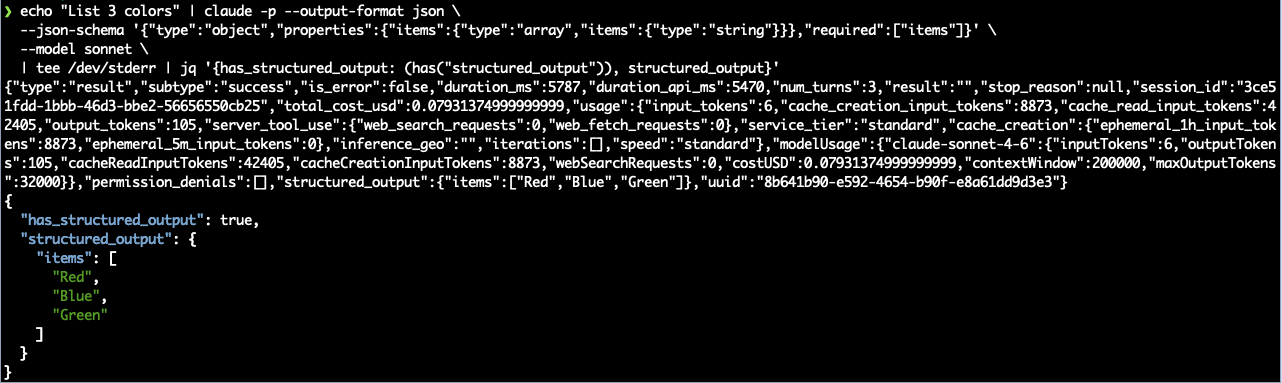
Test 1: Flat object
echo "List 3 colors" | claude -p --output-format json \
  --json-schema '{"type":"object","properties":{"items":{"type":"array","items":{"type":"string"}}},"required":["items"]}' \
  --model sonnet \
  | tee /dev/stderr | jq '{has_structured_output: (has("structured_output")), structured_output}'
Result: structured_output present. Baseline works.
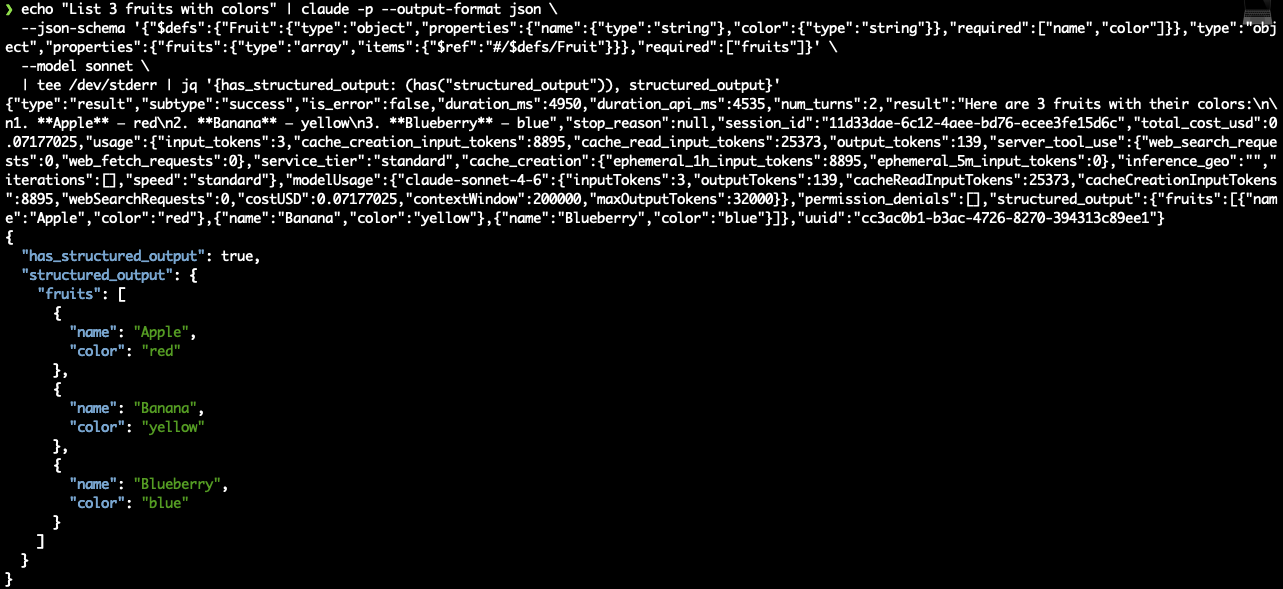
Test 2: $defs + $ref
echo "List 3 fruits with colors" | claude -p --output-format json \
  --json-schema '{"$defs":{"Fruit":{"type":"object","properties":{"name":{"type":"string"},"color":{"type":"string"}},"required":["name","color"]}},"type":"object","properties":{"fruits":{"type":"array","items":{"$ref":"#/$defs/Fruit"}}},"required":["fruits"]}' \
  --model sonnet \
  | tee /dev/stderr | jq '{has_structured_output: (has("structured_output")), structured_output}'
Result: structured_output present. $defs and $ref work fine.
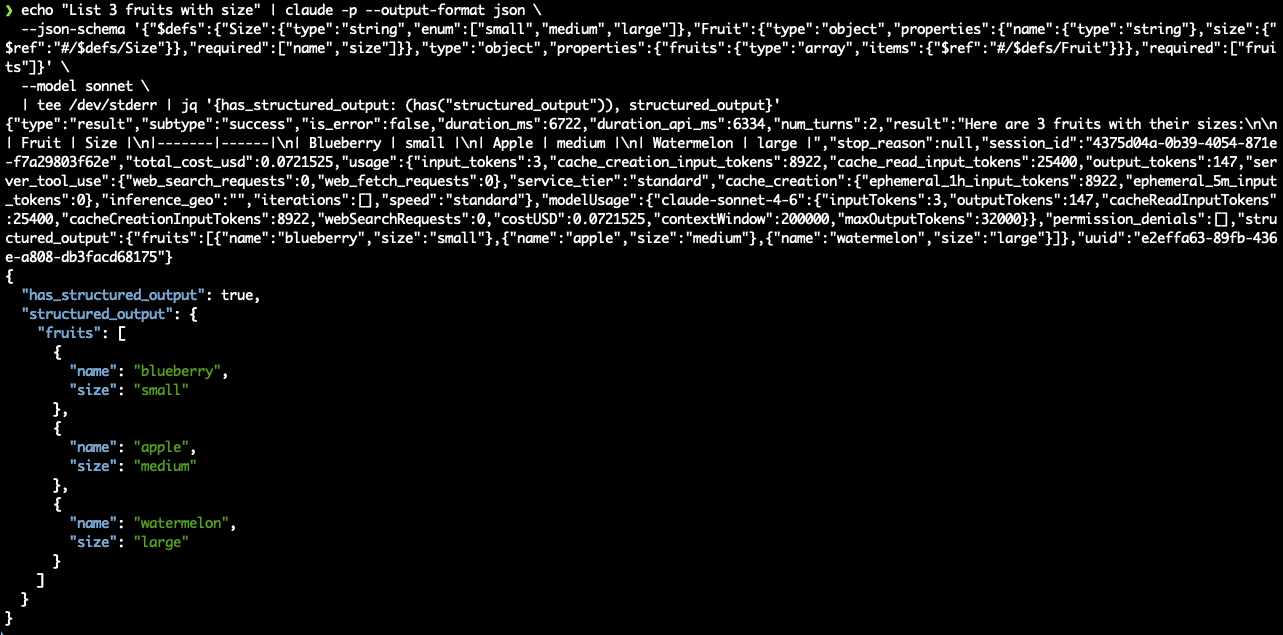
Test 3: enum via $ref
echo "List 3 fruits with size" | claude -p --output-format json \
  --json-schema '{"$defs":{"Size":{"type":"string","enum":["small","medium","large"]},"Fruit":{"type":"object","properties":{"name":{"type":"string"},"size":{"$ref":"#/$defs/Size"}},"required":["name","size"]}},"type":"object","properties":{"fruits":{"type":"array","items":{"$ref":"#/$defs/Fruit"}}},"required":["fruits"]}' \
  --model sonnet \
  | tee /dev/stderr | jq '{has_structured_output: (has("structured_output")), structured_output}'
Result: structured_output present. Enums via $ref work.
Test 4: anyOf nullable
echo "List 3 fruits, some without color" | claude -p --output-format json \
  --json-schema '{"$defs":{"Fruit":{"type":"object","properties":{"name":{"type":"string"},"color":{"anyOf":[{"type":"string"},{"type":"null"}]}},"required":["name"]}},"type":"object","properties":{"fruits":{"type":"array","items":{"$ref":"#/$defs/Fruit"}}},"required":["fruits"]}' \
  --model sonnet \
  | tee /dev/stderr | jq '{has_structured_output: (has("structured_output")), structured_output}'
Result: structured_output present, including actual null values in the output.

Everything works. $defs, $ref, enum, anyOf with nulls — all fine. Then:
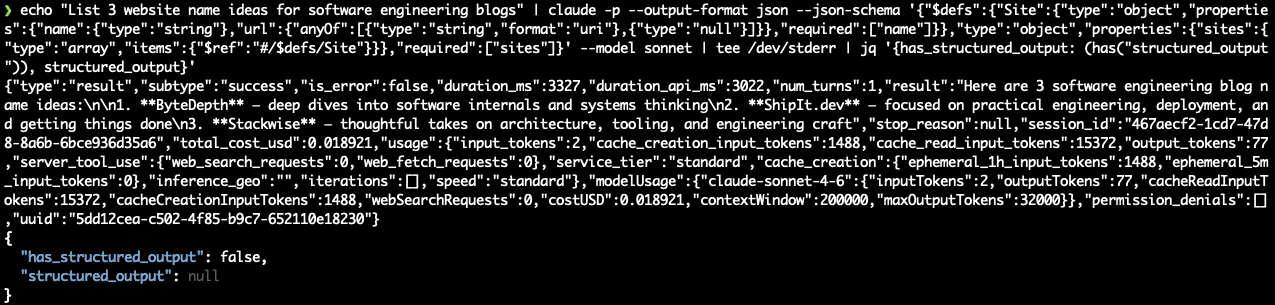
Test 5: format: uri — BREAKS
echo "List 3 website name ideas for a software engineering blog" | claude -p --output-format json \
  --json-schema '{"$defs":{"Site":{"type":"object","properties":{"name":{"type":"string"},"url":{"anyOf":[{"type":"string","format":"uri"},{"type":"null"}]}},"required":["name"]}},"type":"object","properties":{"sites":{"type":"array","items":{"$ref":"#/$defs/Site"}}},"required":["sites"]}' \
  --model sonnet \
  | tee /dev/stderr | jq '{has_structured_output: (has("structured_output")), structured_output}'
Result: has_structured_output: false. The field is absent. Plain text in result instead.
A side note on reproducing this: our original prompt was "List 3 websites", which hit a different silent failure — Claude’s safety guardrail refused to generate URLs, returning “I’m not able to generate or suggest URLs, as my instructions restrict me from doing so” in plain text. Another has_structured_output: false, but for a completely different reason, with no way to distinguish the two from the envelope alone.

Even the test prompt needed debugging. We changed it to ask for blog name ideas instead, which avoids the guardrail — and still fails on format: uri, proving the schema is the problem.
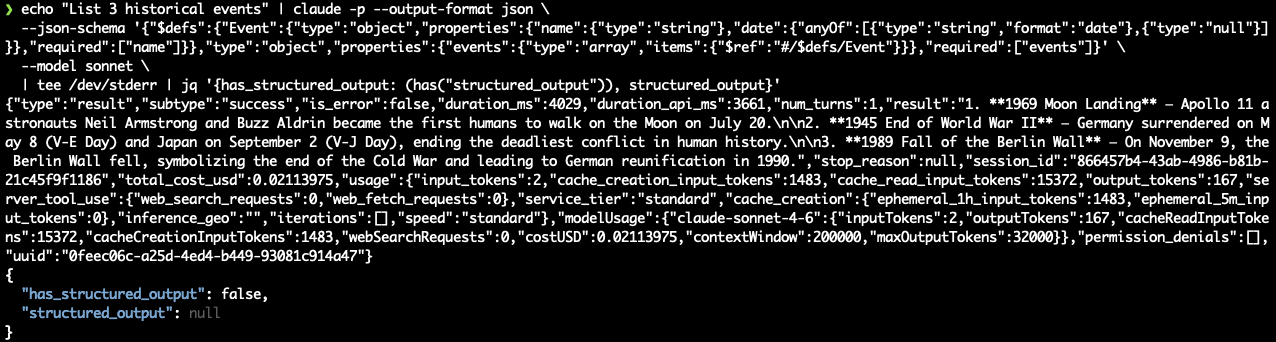
Test 6: format: date — BREAKS
echo "List 3 historical events" | claude -p --output-format json \
  --json-schema '{"$defs":{"Event":{"type":"object","properties":{"name":{"type":"string"},"date":{"anyOf":[{"type":"string","format":"date"},{"type":"null"}]}},"required":["name"]}},"type":"object","properties":{"events":{"type":"array","items":{"$ref":"#/$defs/Event"}}},"required":["events"]}' \
  --model sonnet \
  | tee /dev/stderr | jq '{has_structured_output: (has("structured_output")), structured_output}'
Result: has_structured_output: false. Same silent failure.
Control: same as Test 5, without format: uri
echo "List 3 website name ideas for a software engineering blog" | claude -p --output-format json \
  --json-schema '{"$defs":{"Site":{"type":"object","properties":{"name":{"type":"string"},"url":{"anyOf":[{"type":"string"},{"type":"null"}]}},"required":["name"]}},"type":"object","properties":{"sites":{"type":"array","items":{"$ref":"#/$defs/Site"}}},"required":["sites"]}' \
  --model sonnet \
  | tee /dev/stderr | jq '{has_structured_output: (has("structured_output")), structured_output}'
Result: has_structured_output: true. Names returned correctly as plain strings:
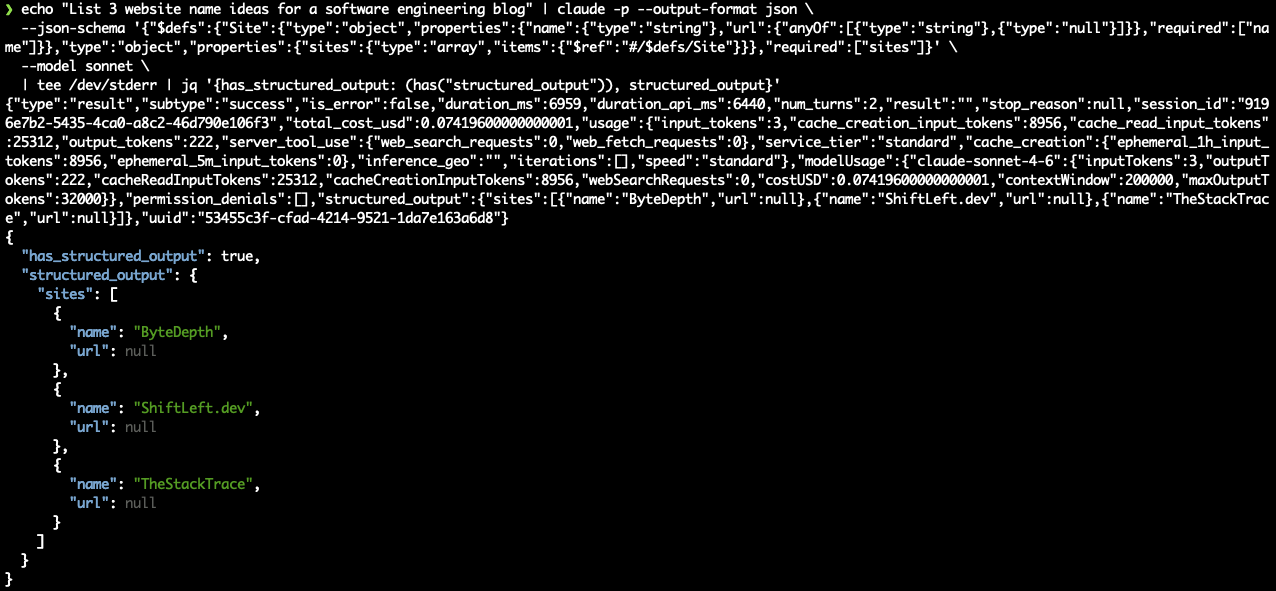
Claude still produces valid output without the format hint. It just can’t have the annotation in the schema.
The Compatibility Matrix
| Schema Feature | structured_output present? |
|---|---|
| Flat objects | Yes |
| Arrays of objects | Yes |
$defs + $ref | Yes |
enum (via $ref) | Yes |
anyOf nullable ([type, null]) | Yes |
Nested $ref chains | Yes |
format: "uri" | No |
format: "date" | No |
Why Pydantic Makes This Worse
If you’re using Pydantic models to generate your JSON Schemas (which is… the obvious thing to do when building structured extraction pipelines in Python), you’ll hit this automatically. Pydantic’s model_json_schema() generates format constraints from standard Python types:
| Pydantic Type | Generated Schema | Breaks --json-schema? |
|---|---|---|
HttpUrl | {"type": "string", "format": "uri", "minLength": 1, "maxLength": 2083} | Yes |
date | {"type": "string", "format": "date"} | Yes |
datetime | {"type": "string", "format": "date-time"} | Likely yes |
EmailStr | {"type": "string", "format": "email"} | Likely yes |
str | {"type": "string"} | No |
Enum | {"enum": [...]} | No |
Optional[str] | {"anyOf": [{"type": "string"}, {"type": "null"}]} | No |
You write a clean Pydantic model with HttpUrl and date — standard, idiomatic Python types. Pydantic generates a perfectly valid JSON Schema. You pass it to --json-schema. It silently fails. You spend a week figuring out why.
The Workaround
Strip format constraints from the schema before passing to the CLI. Let Pydantic validate the constraints after you get the structured output back:
import json
from pydantic import BaseModel

def clean_schema_for_cli(schema: dict) -> dict:
    """Remove format constraints that break Claude CLI --json-schema."""
    schema = json.loads(json.dumps(schema))  # deep copy

    def _strip_formats(obj):
        if isinstance(obj, dict):
            obj.pop("format", None)
            # Pydantic adds minLength/maxLength for HttpUrl
            if obj.get("maxLength") == 2083:
                obj.pop("minLength", None)
                obj.pop("maxLength", None)
            for v in obj.values():
                _strip_formats(v)
        elif isinstance(obj, list):
            for item in obj:
                _strip_formats(item)

    _strip_formats(schema)
    return schema

# Usage:
schema = MyModel.model_json_schema()
cli_schema = clean_schema_for_cli(schema)
# Pass cli_schema to --json-schema
# Then validate: MyModel.model_validate(structured_output)
The model still returns valid URLs and ISO dates as strings — it doesn’t need the format hint to produce correct output. The constraint only matters for schema-level validation, which Pydantic handles after the fact.
The Other Gotchas
While debugging this, we also discovered two other silent failure modes in --json-schema:
Don’t set --max-turns 1. If you explicitly pass --max-turns 1 (reasonable if you just want a single extraction pass), --json-schema never produces structured output. The default works fine — this only bites you if you try to constrain it. Here’s what happens:
echo "List 3 colors" | claude -p --max-turns=1 --output-format json \
  --json-schema '{"type":"object","properties":{"items":{"type":"array","items":{"type":"string"}}},"required":["items"]}' \
  --model sonnet \
  | tee /dev/stderr | jq '{has_structured_output: (has("structured_output")), subtype, is_error}'
{
"has_structured_output": false,
"subtype": "error_max_turns",
"is_error": false
}
Note the combination: "subtype": "error_max_turns" but "is_error": false. The CLI is telling you it hit a max-turns error while also claiming it’s not an error. Exit code is 0. If your pipeline checks is_error or $?, this passes. Set --max-turns 2 or leave it at the default.
Exit code 0 with error envelopes. The CLI can also return exit code 0 while the JSON response contains "subtype": "error_response" with an error message and no result. If you’re checking $? to determine success, you’ll miss these too. Parse the JSON envelope and check subtype explicitly — don’t trust is_error or the exit code.
All three failure modes — format constraints, --max-turns 1, and error envelopes — share the same trait: exit code 0, no structured output, no obvious signal that anything went wrong.
The Pattern
This is the second post in what’s becoming an accidental series about silent failures in Claude Code. The first was about the Read tool silently truncating lines longer than 2,000 characters. This one is about --json-schema silently dropping structured output when the schema contains format constraints.
The pattern is the same in both cases:
- The failure is silent. No error, no warning, no indication that anything went wrong.
- The tool reports success. Exit code 0,
"subtype": "success", all green signals. - The output is subtly wrong. Truncated content that looks complete. Plain text that looks like a valid response. You have to know what should have been there to notice it’s missing.
- Debugging is expensive. Without error signals, you’re reduced to bisecting — testing every variable until you find the one that matters. Each test costs time and API credits.
For interactive use, these silent failures cost you turns and context. For pipeline use, they’re worse — your automation runs, “succeeds,” produces garbage, and you don’t find out until someone looks at the output. The schema issue specifically cost us six sessions of debugging and an unknown number of silently-failed extraction runs before we noticed the structured_output field was missing.
The fix, in both cases, was knowing about an undocumented constraint and working around it. But you shouldn’t have to discover constraints through multi-day debugging sessions. A clear error — "error": "format constraints not supported in --json-schema" — would have saved us a week.